
GPU-Accelerated Image Rendering for Faster Web Browsing
Overview
The software is a browser extension designed to enhance image rendering performance on web pages containing numerous images. It leverages HTML5 Canvas and GPU processing to redraw image elements, aiming to improve responsiveness during page interactions. This tool is particularly relevant for users encountering sluggish behavior when navigating image-heavy websites, such as photo galleries, e-commerce platforms, or content-rich news portals.
While the developer notes that modern browsers like Chrome likely handle basic image rendering efficiently, the extension serves as a technical experiment and reference implementation. Its purpose is to demonstrate how GPU-accelerated rendering via Canvas can influence rendering performance, even if practical benefits are limited in current environments. The extension is not intended as a production-grade performance solution but rather as a demonstration of a specific rendering technique.
Target users include developers, students, and tech enthusiasts interested in web performance optimization, browser internals, or experimental rendering methods. The tool may also appeal to individuals exploring how Canvas-based rendering compares to native image handling in web browsers.
Key Features & Capabilities
- GPU-Accelerated Image Redrawing – Uses HTML5 Canvas to redraw IMG elements, offloading rendering tasks to the GPU for potentially faster display.
- Dynamic Image Handling – Detects and processes images loaded via AJAX, ensuring newly added images are also rendered using the Canvas method.
- Non-Destructive Rendering – Original IMG elements remain in the DOM but are hidden, preserving the page structure for future modifications or debugging.
- Dependency Minimization – Removed jQuery dependency in version 0.17.7.2, reducing overhead and improving compatibility with modern extension frameworks.
- Compatibility with Modern Manifests – Updated to use the latest Chrome Extension manifest format, ensuring alignment with current browser security and execution standards.
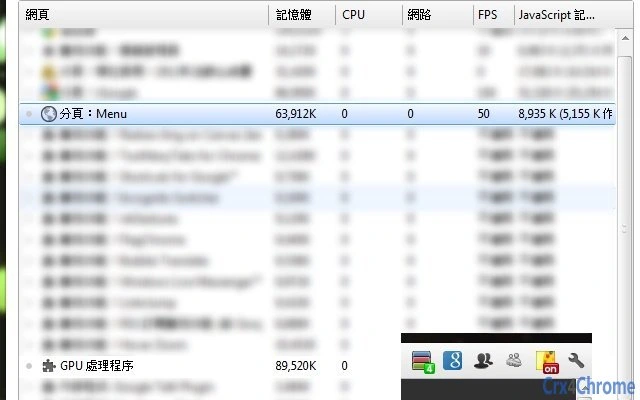
These features are primarily intended for educational and experimental purposes. Users may observe changes in FPS and GPU memory usage, though the extension does not guarantee performance improvements. The ability to handle dynamically loaded images makes it suitable for testing in modern, interactive web applications. The preservation of original elements allows developers to compare rendering outcomes without disrupting the page’s original structure.
User Interface, Workflow & Performance
The extension operates without a visible user interface. Activation is triggered by clicking a browser icon, which initiates the Canvas-based rendering process across all visible images on the current page. The workflow is minimal and automatic, requiring no configuration or user input beyond the initial click.
Navigation and interaction are limited to the browser’s standard interface. Users do not need to adjust settings or manage preferences. The extension runs silently in the background, applying its rendering logic to image elements as needed.
Performance observations are based on general software behavior patterns. The developer acknowledges that GPU memory usage and FPS may increase, but exact resource consumption details were not specified. The original IMG elements remain in the DOM, which may contribute to temporary memory increases, though the impact appears to be minimal. Stability is not reported beyond the extension’s operational state, and no issues with crashes or browser slowdowns were mentioned.
Compatibility & System Requirements
The extension is compatible with Windows, Mac, and Linux operating systems. It is designed to run within the Chrome browser environment, leveraging Chrome’s extension architecture and rendering engine.
The installation size is 256 KB, which is minimal and typical for lightweight browser extensions. The software version is 0.17.7.2, released on August 12, 2023. Exact system requirements were not listed, and no specific hardware specifications are provided. The developer did not specify resource usage details such as CPU or RAM consumption.
Pros and Cons
Pros
- Lightweight installation at just 256 KB
- Non-invasive approach—original image elements remain in the DOM
- Supports dynamically loaded images via AJAX
- Updated to modern Chrome Extension manifest standards
- Free to use with no licensing restrictions
Cons
- No visible user interface or configuration options
- Performance benefits are uncertain and may be negligible on modern browsers
- Original images are hidden but not removed, potentially increasing memory usage
- Primarily experimental—intended as a learning tool, not a production solution
- Limited documentation and support beyond GitHub repository
FAQ Section
Is this extension compatible with all Chrome versions?
The extension uses the latest Chrome Extension manifest format, which supports recent Chrome versions. Compatibility with older versions is not guaranteed and was not specified by the developer.
Does the extension require an internet connection to function?
Once installed, the extension operates offline and does not require an internet connection to render images on a page.
Is the extension safe to use?
The extension is open-source and available on GitHub. Users can review the code for security concerns. As with any browser extension, it’s recommended to install only from trusted sources.
Can I update the extension automatically?
Chrome automatically updates extensions when new versions are released, provided the extension is installed from the Chrome Web Store.
Does this extension work on browsers other than Chrome?
The extension is specifically designed for Chrome. There is no official support for other browsers such as Firefox, Edge, or Safari.
Final Thoughts
This browser extension serves as a niche, experimental tool for developers and students exploring GPU-accelerated image rendering in web environments. While it may not deliver measurable performance gains on modern browsers, its value lies in its transparency, minimal footprint, and educational purpose. The clean codebase and open-source nature make it a useful reference for understanding how Canvas-based rendering can be integrated into web workflows.
For users seeking real-world performance improvements on image-heavy pages, this extension is unlikely to provide significant benefits. However, for those interested in browser internals, rendering techniques, or web optimization experiments, it offers a functional and lightweight entry point. The lack of a UI and the experimental nature mean it’s not suitable for general consumers.
Download Img_on_Canvas now







